

A forex VPS keeps MT4 or MT5 trading robots running around the clock, so a sleeping laptop or dropped Wi-Fi connection no longer causes missed entries, slipped orders, or stop-losses that never fire. The article argues that proximity to your broker's data center, with ping under 5 ms, matters more than raw CPU, and that 1 to 2 GB of RAM usually suffices for one or two Expert Advisors at roughly $5 to $15 monthly.
It compares seven providers on price, latency, locations, and ease of running MetaTrader. ValeTax offers a free VPS to eligible live-account clients, making it the cheapest choice if you already trade there. ForexVPS (about $30) and My Forex VPS (low $20s) are specialist, trading-aware options. MassiveGRID adds automatic failover in the mid-teens. Contabo, Hostinger, and OVHcloud are cheap, unmanaged hosts for technical users, though Windows licenses, Wine on Linux, and long-term renewal pricing raise real costs.
The advice: choose the location nearest your broker, start with a short term, ping the broker's trade server during the first week, then commit. Trading carries significant risk.
7 Best VPS Hosting for Forex Cheap Low-Latency Picks
If your trading robot stops because your laptop went to sleep or your home Wi-Fi dropped, you already know why traders look for VPS hosting forex setups. A bad connection can mean missed entries, slipped orders, and stop-losses that never fire. A cheap server running 24/7 fixes most of that.
A forex VPS is a remote Windows or Linux machine that runs MT4 or MT5 around the clock. Pick a provider with servers near your broker's data center, since ping under 5 ms matters more than raw CPU. For most retail traders running one or two Expert Advisors, 1 to 2 GB of RAM and a single core is enough, and that costs roughly $5 to $15 a month.
Below, you'll find seven providers compared on price, latency, server locations, and how easily they run MT4/MT5. Each pick includes who it suits best. At ValeTax, we offer free VPS to eligible users, so we'll also show you when you can skip paying for one. Remember that forex and CFD trading carries significant risk.
1. ValeTax free VPS for eligible traders
How it works
ValeTax gives eligible clients a free VPS for running MT4 and MT5 around the clock. You open a live account, meet the conditions, and request the server. Then you connect remotely, install your Expert Advisors, and leave them running.
Because there is no monthly invoice, this is the cheapest VPS hosting forex option on the list, as long as you trade with ValeTax anyway. You also skip comparing plans and setting up separate billing.
Who it is for
Traders who already use ValeTax get the most value. A beginner running one robot on a Cent Account, or a bonus hunter testing a strategy, has no reason to pay for hosting before the strategy proves itself.
Scalpers should test first. If your edge depends on a few milliseconds, measure latency before you commit, and consider a paid forex VPS provider with a location you choose yourself.
Price and eligibility
The price is $0 for eligible users. ValeTax sets the conditions and they can change, so confirm the current rules on the ValeTax site before you plan around it.
- Cost: free for eligible users
- Platforms: MT4 and MT5
- Requirement: a ValeTax live account that meets the current VPS conditions
- Billing: none, so nothing to cancel or renew
Server locations and latency
Location decides latency more than any plan spec. Ask ValeTax support which data center hosts your VPS, then run a ping test from the server to your trading platform's server.
Swing and hourly-chart robots rarely care about a few extra milliseconds. Fast scalpers do, and they should treat the first week as a trial.
A free VPS is only a bargain if its ping to your broker is low.
Pros and limitations
Here is the honest trade-off. You save the monthly fee and keep broker and server under one roof, but you give up some flexibility compared with a paid host.
- Pro: zero hosting cost for eligible accounts
- Pro: one provider to contact when something breaks
- Pro: runs MT4 and MT5 24/7 without your laptop
- Limitation: eligibility conditions apply and may change
- Limitation: tied to your ValeTax account
- Limitation: fewer plan choices than a paid forex VPS hosting provider
2. ForexVPS
How it works
ForexVPS is a specialist forex VPS provider that sells Windows servers tuned for MT4 and MT5. You choose a plan and a data center, log in through Remote Desktop, and install your platform and Expert Advisors.
Because the service focuses on trading, support is geared toward platform issues rather than general web hosting.
Who it is for
High-frequency EA users and scalpers fit best. If one missed fill costs more than the monthly fee, a low-latency server pays for itself.
Casual traders running one robot on H1 charts can spend less elsewhere on this list.
Price and eligibility
Plans usually start around $30 a month, which sits above the cheap forex VPS tier. Prices change, so check the current plan page before you buy.
- Eligibility: open to anyone, with any broker
- Platforms: MT4 and MT5 on Windows
- Billing: monthly, with discounts on longer terms
Server locations and latency
ForexVPS advertises data centers in major financial hubs such as New York and London, near where many brokers host their servers. Pick the city closest to your broker's server, then test ping in the first days of service.
Paying for a premium forex VPS only helps if its data center sits next to your broker.
Pros and limitations
You get a trading-focused service with strong latency claims, but you pay for that focus.
- Pro: built around MT4 and MT5
- Pro: data centers in key financial hubs
- Pro: works with any broker
- Limitation: higher price than budget hosts
- Limitation: overkill for slow-timeframe robots
3. My Forex VPS
How it works
My Forex VPS is a forex-focused hosting service that rents you a Windows server for MT4 and MT5. You pick a plan, log in over Remote Desktop, and install your Expert Advisors just as you would on a home PC.
Who it is for
Traders who run several EAs and want MetaTrader-aware support fit best. A managed setup saves time if you would rather not configure Windows yourself.
Budget traders can pass. If you run one robot on H1 charts, a cheap forex VPS later on this list does the same job for less.
Price and eligibility
Plans usually start in the low $20s per month, which makes this a mid-priced option rather than the cheapest one. Prices change, so confirm current rates before you buy.
- Eligibility: open to anyone, with any broker
- Platforms: MT4 and MT5 on Windows
- Billing: monthly, with longer terms usually cheaper
Server locations and latency
The provider lists data centers in financial hubs such as New York and London. Choose the city nearest your broker's server, then ping from the VPS during the first week.
Latency depends on where your broker hosts its trade servers, not on the plan tier. Ask your broker before you pay.
The best VPS location is the one closest to your broker, not to you.
Pros and limitations
This is a solid mid-range pick with clear trade-offs.
- Pro: built for MT4 and MT5
- Pro: support that understands trading platforms
- Limitation: pricier than budget hosts
- Limitation: more than a single slow robot needs
4. MassiveGRID Forex VPS
How it works
MassiveGRID hosts its forex VPS servers on a high-availability cloud cluster. If the physical host fails, your server restarts on another node. You log in over Remote Desktop and install MT4 or MT5 as on any Windows VPS.
Who it is for
Traders with larger or funded accounts get the most from it, because downtime costs more there. If you want a VPS for MT4 that survives hardware failure, it fits well. Hobbyists running one demo robot don't need that protection.
Price and eligibility
Entry plans typically start in the mid-teens per month. That is pricier than budget hosts and cheaper than specialist ones. Prices change, so check the current plan page before you buy.
- Eligibility: open to anyone, with any broker
- Platforms: MT4 and MT5 on Windows
- Billing: monthly, with discounts on longer terms
Server locations and latency
Data centers are listed in New York, London, Frankfurt, and Singapore. Choose the city nearest your broker's trade server, then ping from the VPS during the first week.
Redundancy keeps your robot alive, but only proximity keeps it fast.
Pros and limitations
You get uptime protection at a mid-range price, but you pay for resilience you may never need.
- Pro: automatic failover if hardware fails
- Pro: data centers in key financial hubs
- Limitation: costs more than a basic cheap forex VPS
- Limitation: extra redundancy adds little for slow, single-robot setups
5. Contabo Forex VPS
How it works
Contabo is a general cloud host, not a forex specialist. You rent a Windows or Linux server, connect through Remote Desktop, and install MT4 or MT5 yourself.
Nothing comes preconfigured for trading. It is an unmanaged server, so you handle Windows updates and setup on your own.
Who it is for
Technical traders who are comfortable with Windows and want the most RAM per dollar fit best. A VPS for MT4 with several robots and many open charts runs comfortably here. Beginners who want hand-holding should choose a managed provider.
Price and eligibility
Base plans start at roughly $5 to $6 a month, which makes this the cheapest forex VPS tier on the list. Windows needs a separate license fee, so budget more. Short terms may add a setup fee, so read the checkout page.
- Eligibility: open to anyone, with any broker
- Platforms: MT4 and MT5 on Windows
- Billing: 1, 3, 6, or 12 months, with longer terms cheaper
Server locations and latency
Contabo runs data centers across the US, Europe, and Asia. They are general hosting sites, not racks beside trading hubs, so ping to your broker may be higher than at a specialist. Run a ping test before you commit to a long term.
Cheap specs only help if the ping to your broker stays low.
Pros and limitations
You get strong hardware for little money, but you do the admin work.
- Pro: very low price for the resources
- Pro: many locations to choose from
- Limitation: no trading-specific support
- Limitation: Windows license raises the real cost
- Limitation: latency to broker servers needs testing
6. Hostinger VPS for forex
How it works

Hostinger is a general web host with KVM-based VPS plans, not a forex specialist. Its servers run Linux, and the company does not sell Windows VPS plans, so MetaTrader has to run through Wine. That works for many Expert Advisors, but it is a DIY setup, and you fix it yourself when something breaks.
Who it is for
Linux-comfortable traders who want very cheap VPS hosting for forex fit best. If you can install Wine and manage a server over SSH, you get a lot of RAM for little money. Beginners and anyone using Windows-only indicators or DLLs should pick a Windows host instead.
Price and eligibility
Entry plans start at roughly $5 to $7 a month, but those prices usually require a 24-month term. Renewal rates are higher, so read the checkout page before you commit.
- Eligibility: open to anyone, with any broker
- Platforms: MT4 and MT5 via Wine on Linux
- Billing: 1 to 24 months, with longer terms cheaper
Server locations and latency
Hostinger runs data centers across the US, Europe, Asia, and South America. They are general hosting sites, not racks beside trading hubs. Ping your broker's trade server from a short-term plan first, then sign a long term only if the numbers hold up.
A VPS for MT4 that can't run MT4 natively is only cheap if you can maintain it.
Pros and limitations
You get low cost and generous specs, but you give up native Windows and trading-specific support.
- Pro: one of the lowest prices for the resources
- Pro: several regions to choose from
- Limitation: no Windows plans, so MT4 needs Wine
- Limitation: no trading-focused support
- Limitation: long-term pricing locks you in
7. OVHcloud Forex VPS
How it works
OVHcloud is a large European cloud host, not a forex specialist. You rent a VPS, add a Windows Server license at checkout, and connect over Remote Desktop. Then you install MT4 or MT5 yourself. It is an unmanaged server, so updates and setup are on you.
Who it is for
Traders who want a cheap forex VPS from an established provider fit well, especially if you need a location in Asia-Pacific or Europe. Beginners who want trading-aware support should choose a managed host instead.
Price and eligibility
Entry plans start at roughly $5 to $7 a month, and the Windows license adds to that. Prices change, so check the order page before you buy.
- Eligibility: open to anyone, with any broker
- Platforms: MT4 and MT5 on Windows
- Billing: monthly, with discounts on longer terms
Server locations and latency
Data centers span North America, Europe, and Asia-Pacific, including London, Frankfurt, and Singapore. They are general hosting sites, so ping your broker's trade server from the VPS and start with a short term before you commit.
A wide choice of locations only helps if one of them sits near your broker.
Pros and limitations
You get big-brand infrastructure at a low price, but you handle the admin work yourself.
- Pro: low entry price for the resources
- Pro: many regions to choose from
- Limitation: no trading-specific support
- Limitation: Windows license raises the real cost
- Limitation: latency to broker servers needs testing
Picking the right VPS for your setup
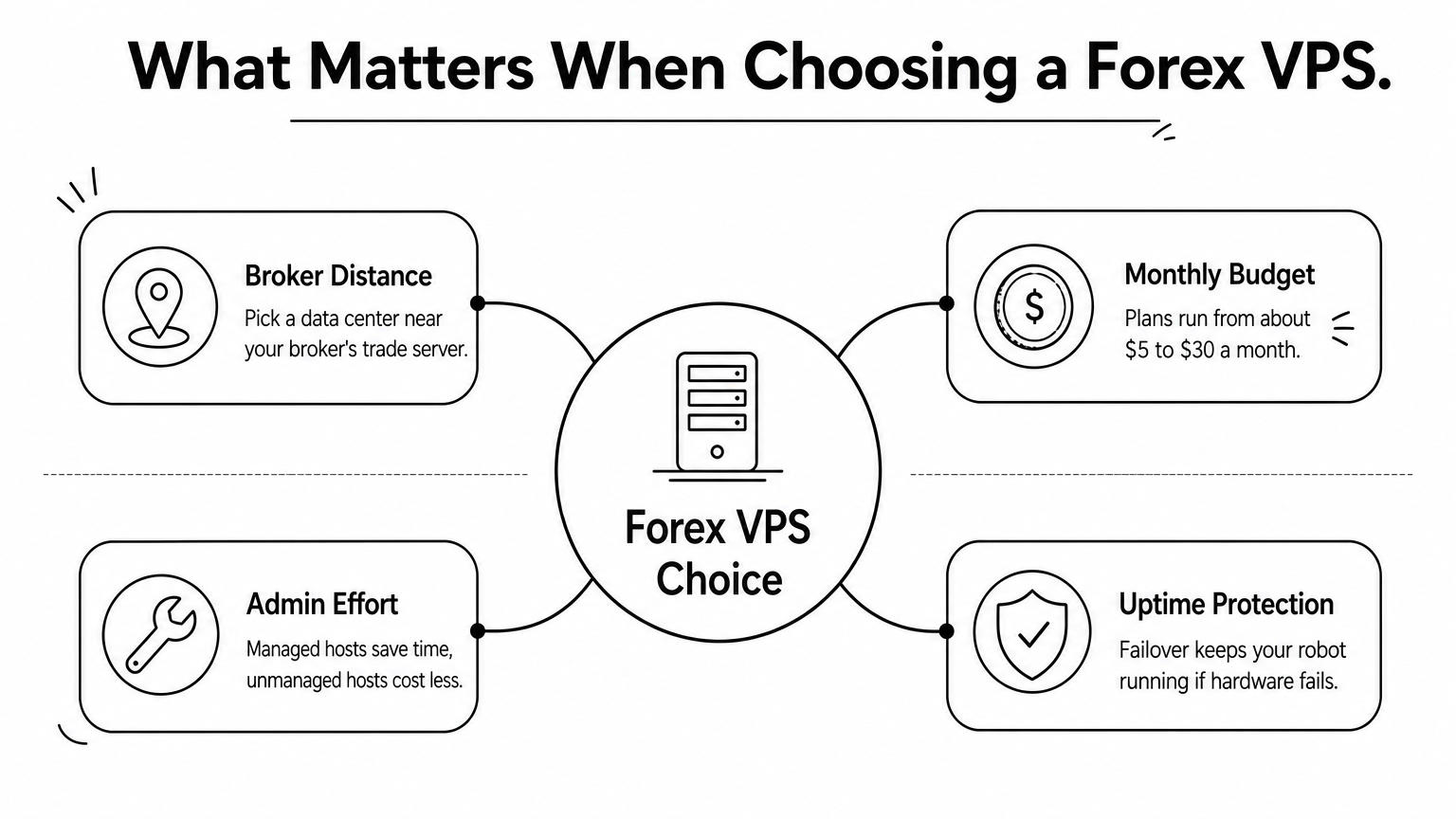
The best VPS hosting forex choice comes down to two things: distance to your broker and your budget. ForexVPS and My Forex VPS cost more but bring trading-aware support. MassiveGRID adds failover. Contabo, Hostinger, and OVHcloud give you the lowest prices if you can handle the admin yourself.
Whatever you pick, start with a short term. Ping your broker's trade server during the first week, and only then commit to a longer plan. A cheap server with high latency costs more than a pricier one that sits next to your broker.
Before you pay anyone, check whether you need to. If you trade with ValeTax, an eligible account can get a free VPS for MT4 and MT5. Open a ValeTax account and see if you qualify. Forex trading carries significant risk, so test your robots with small size first.
